
Boost grades with digital whiteboards in online science tutoring. Discover tools, templates, and workflows that make lessons interactive, clear, and test-ready.
Why digital whiteboards transform science learning
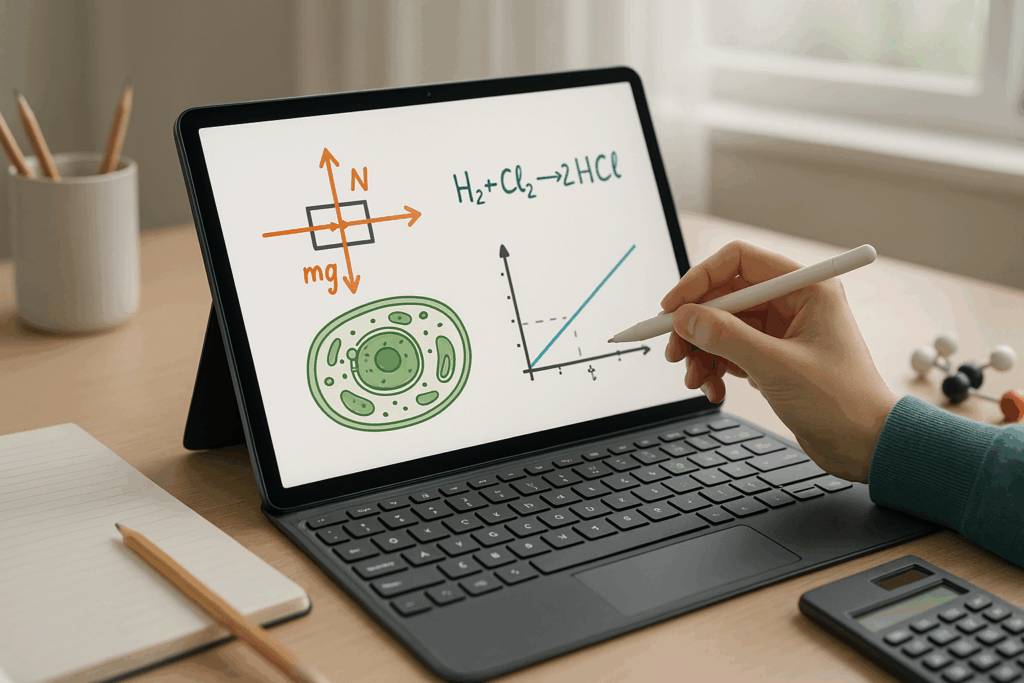
Digital whiteboards act like a shared lab bench, a notebook, and graph paper rolled into one, giving tutors and students a dynamic space to draw, annotate, and iterate. In science, where models, diagrams, and step-by-step reasoning drive understanding, the canvas becomes a thinking partner. Clear visuals reduce cognitive load, color-coding separates ideas, and saved frames turn each lesson into reusable study materials. When learners actively sketch forces, balance equations, or map biological pathways, they move from passively watching to owning the method behind the answer. That shift builds durable memory, confidence, and test-day speed.
- Real-time collaboration keeps students engaged and accountable.
- Exportable boards become study packets for targeted review.
- Color and structure highlight steps and prevent oversight.
- Infinite canvas supports complex systems without clutter.
- Layering, frames, and templates make lessons repeatable and efficient.
Core features of digital whiteboards for tutoring
Picking the right tool matters less than matching features to goals. Aim for frictionless writing, fast collaboration, and reliable export options. An infinite canvas and sensible layers help you separate topics while still linking ideas. Accurate pen tools and shape aids make clean physics vectors, crisp geometry, and tidy labels. Equation editors, grid backgrounds, and image import round out the science toolkit.
- Infinite canvas with frames and layers for topic flow
- High-precision pen, shape, arrow, and color tools
- Equation support for subscripts, superscripts, and units
- Graphing or easy integration with Desmos/GeoGebra
- Image import for microscopes, lab setups, and tables
- Templates you can duplicate for repeatable structures
- Export to PDF/PNG; quick share links and permissions
- Low-latency ink and autosave/version history
Set up your digital whiteboards workspace
Consistent visual routines lower student stress and focus attention on the reasoning. Start each session with a dated frame and an agenda, then move left-to-right from problem to reflection. Reserve a parking-lot corner for off-topic questions, and keep a color legend to ensure visual meanings stay stable across weeks. Templates make your process scalable: dimensional analysis grids, CER frames, and lab plans all save time.
- Title, course tag, and date at the top of every frame
- Standard color palette: givens (blue), steps (green), pitfalls (red)
- Icons/symbols key: Δ, →, ⊥, Σ, |v|, q, k, pH, etc.
- Grid or dot backgrounds for alignment and neatness
- Quick-access tools: ruler, protractor, vector arrows, tables
- Reusable frames for FBDs, stoichiometry ladders, and CER
Subject workflows using digital whiteboards
Physics thrives on diagrams and proportional reasoning. Chemistry clicks when mole paths and charges are explicit. Biology benefits from labeled structures and flows. Keep procedures visible, narrate why each step is chosen, and box final answers with units and a quick sense-check. Encourage students to ink first, then explain their choices while you prompt with minimal text.
- Physics: Free-Body Diagrams with labeled forces, kinematics tables, VT/PT graph shapes, slope/area interpretations, energy bar charts
- Chemistry: Colored atom-counting, balancing layouts, stoichiometry ladders, titration curves, VSEPR shape sketches with angles
- Biology: Cell and tissue diagrams, photosynthesis and respiration pathways, genetics grids, system flow maps with arrows
- Crossovers: Trig for vectors, uncertainty tables, proportional reasoning annotations, unit bridges for conversions
Active-learning routines with digital whiteboards
Make thinking visible and correctable. Rotating roles keeps students from hiding in the margins; deliberate error hunts surface misconceptions; layer reveals model expert reasoning without stealing productive struggle. Use color to separate student production from tutor prompts and keep answers masked until reasoning is stable.
- Think–Ink–Share with time-boxed sketching
- Error hunts on seeded mistakes for precision
- Layered reveals to scaffold complex derivations
- Dual-color dialogue: student vs. tutor inks
- Exit sticky with “learned” and “lingering question”
- Confidence traffic lights to guide pacing
Note-taking and study systems on digital whiteboards
Whiteboards can double as a study spine. Cornell-style frames organize cues, notes, and summaries. Formula banks show conditions of use, not just the symbols. Unit and mistake cards reduce repeated errors. Export after each session with a five-bullet recap and next steps. Over time, these exports form a personalized textbook aligned to the student’s course.
- Cornell frames for recall cues and summaries
- Formula banks with constraints and examples
- Unit conversion walls for instant checks
- Mistake logs by chapter to target practice
- Export routine with recap, drills, and deadlines
Assessment in the Flow: Formative Feedback Without Friction
Short, frequent checks beat long, late ones. Use two-minute problems to sample mastery, then fade scaffolds from worked examples to independent work. Ask students to justify equation selections in small side boxes, and keep a visible timer for pacing. Duplicate frames before trying alternate strategies so you can compare, annotate, and select the clearest path.
- Micro-quizzes with visible timers
- Faded scaffolding to build independence
- Self-explanations boxed next to solutions
- Versioned frames for approach comparison
- Rubrics pinned on the board for transparency
Templates That Save Time and Improve Clarity
Templates reduce cognitive load and allow instant organization. A dimensional analysis grid forces correct unit cancellation. CER frames discipline lab reasoning. Lab plans bring safety and variables to the front. Problem-solving flows anchor a repeatable method students can apply across topics.
- Dimensional Analysis: quantity → factor → cancel → result
- CER: claim, evidence (data/figures), reasoning (principle/law)
- Lab Plan: IV/DV/controls, materials, safety, data tables
- Problem Flow: knowns, diagram, pick formula, solve, check, reflect
- Graph Analysis: slope, area, intercepts, interpretation cells
Cognitive Load Management: Clear, Focused, Learnable
Use one idea per frame and zoom to limit clutter. Separate givens, process, and results with whitespace and borders. Keep a consistent palette and line weights, and align with grids. Record short snippets for dense steps. When in doubt, draw first and label second to keep lines clean and legible.
- One idea per frame; link with arrows for sequence
- Chunk steps into visual blocks with borders
- Consistent palette and stroke widths for hierarchy
- Grid alignment and snap-to guides for neatness
- Short recordings for complex derivations
Classroom Management Online: Roles, Rights, and Norms
Clear roles cut through chaos. Assign a scribe, rotate responsibilities, and restrict edit rights when necessary. Set norms around erasing and initials for accountability. Duplicate frames before risky edits so your history remains intact. Use hand-raise icons to structure turn-taking and keep discussions equitable.
- Scribe rotations with named turns
- Edit/view toggles to protect work
- Versioning before experiments
- Erase-with-check norm and initials on contributions
- Hand-raise and queue lists for fairness
Integrations That Supercharge Your Canvas
Bring in the best of EdTech. Embed or pair with graphing tools for instant plots. Run PhET simulations, capture observations, and sketch data next to the sim. Clip textbook items for direct annotation. Autosync exports to a shared drive so families and students can track progress without hunting through inboxes.
- Desmos/GeoGebra for graphs and geometry
- PhET simulations with side-by-side data capture
- Screen clips of problems for live markup
- Cloud drives for organized, ongoing archives
- Stylus and tablet pairings for smoother ink
Troubleshooting and Quality Control
Lag kills flow—minimize layers, close tabs, and switch to lighter backgrounds. Messy writing improves with thicker strokes and zoom. If edits don’t sync, confirm permissions and refresh the session. Calibrate styluses and enable palm rejection. Build autosave checkpoints and export periodically during long sessions.
- Reduce layers and background complexity to cut lag
- Increase stroke width and zoom for legibility
- Verify share links and permissions on glitches
- Calibrate hardware; update drivers; check palm rejection
- Autosave on; export every 15 minutes on longer builds
A 60-Minute Whiteboard-Driven Science Session
Start with a quick bridge to prior knowledge, then set an agenda with goals. Model one exemplar solution and save a clean snapshot. Shift to student-led work with prompts and strategic questioning. Close with a summary frame, a micro-quiz, and exports that include targeted practice and dates. The structure reduces anxiety, protects time, and produces a coherent study trail.
- 0–5: Warm-up + confidence check
- 5–10: Agenda, goals, expected pitfalls
- 10–25: Modeled example with narrated reasoning
- 25–40: Student-led problem with tutor prompts
- 40–50: Error analysis and comparison
- 50–55: Summary frame and mini self-quiz
- 55–60: Export, assign practice, schedule next step
Accessibility, Inclusivity, and Clarity for All Learners
High-contrast palettes aid visibility; avoid red/green dependence. Use larger strokes and spacious layouts. Provide keyboard shortcuts for students without styluses. Offer multi-modal explanations—diagram, typed steps, and verbal reasoning. When exporting, add alt text to inserted images and maintain clear file names for navigation.
- High contrast and color-agnostic cues
- Larger strokes and generous spacing
- Keyboard navigation and shortcut lists
- Multi-modal presentation of steps and rationale
- Alt text and descriptive export naming
Building Independent Learners with Repeatable Habits
Teach students to title frames, state goals upfront, and box final answers with units. Encourage annotation of why each step is chosen. Tag frames by topic, and create weekly “cheat sheet” collages from exported frames. Over time, students internalize the workflow and apply it confidently on timed tests and labs.
- Title/date frames and state the goal
- Box answers with units and a quick sense-check
- Annotate the why behind steps
- Tag frames by topic for fast retrieval
- Weekly cheat-sheet exports for spaced review
Pro Tips for Precision and Visual Quality
Neat lines, aligned labels, and consistent arrows enhance comprehension and grading speed. Use arrows for flow, avoid crossed lines, and reserve colors by meaning. Duplicate a clean “exemplar” before experimenting, and watermark shared snapshots. Above all, keep the canvas readable at a glance, as if preparing a solution key.
- Draw first, then label for tidy lines
- Align with grid/snap; avoid crossings
- Consistent color roles for immediate recognition
- Save a clean exemplar before branching
- Watermark widely shared frames if needed
How MST Tutoring Personalizes Your Whiteboard Experience
MST Tutoring starts with diagnostics to map strengths and gaps, then builds custom templates aligned with your course and teacher’s rubrics. Weekly exports include progress snapshots and specific next steps. During test-prep sprints, we time problems, reveal helper layers strategically, and coach confidence so students can take the pen and perform. The result is a repeatable, crystal-clear method students trust under pressure.
- Diagnostic mapping and goal setting
- Custom frames tuned to class expectations
- Weekly exports with growth notes
- Timed sprints and reveal-on-demand scaffolds
- Confidence coaching with student-led inking
Make science click: Reserve your MST Tutoring spot today
Ready to make science click on screen and on tests? Let’s build your visual mastery. Book your whiteboard-powered session at MST Tutoring today—secure your spot, streamline your studying, and start earning higher scores.
You might find interesting